GitHub
Overview
Visualize and analyze GitHub resources, including repositories, packages, workflow jobs, and SBOM documents. Gain insights into resource utilization, governance, and security posture. Generate and monitor SBOMs, identify vulnerabilities in repositories and packages, and improve overall visibility and compliance within your GitHub environment.
Configurations
| Configuration | Description |
|---|---|
| Blueprint Account Name | A human-readable name for your account that will be used to identify this account across the application. |
| Github Auth Token | The GitHub personal access token used for authentication. Ensure that the token has the necessary scopes for repository and organization access. Details in the Permissions section. |
| Org Name | The name of the GitHub organization to be monitored. |
| Data Crawl Frequency | The frequency at which Kscope will scan your repositories for changes and updates. |
| Resource Selection | Selectively include or exclude certain resources. See example below. |
Permissions
The GitHub blueprint requires a Personal access token (classic) which you can create by clicking here. Please ensure that you select "No expiration" otherwise the blueprint will start failing when the token expires.
The screenshot shows all the scopes that are needed and are selected by default.
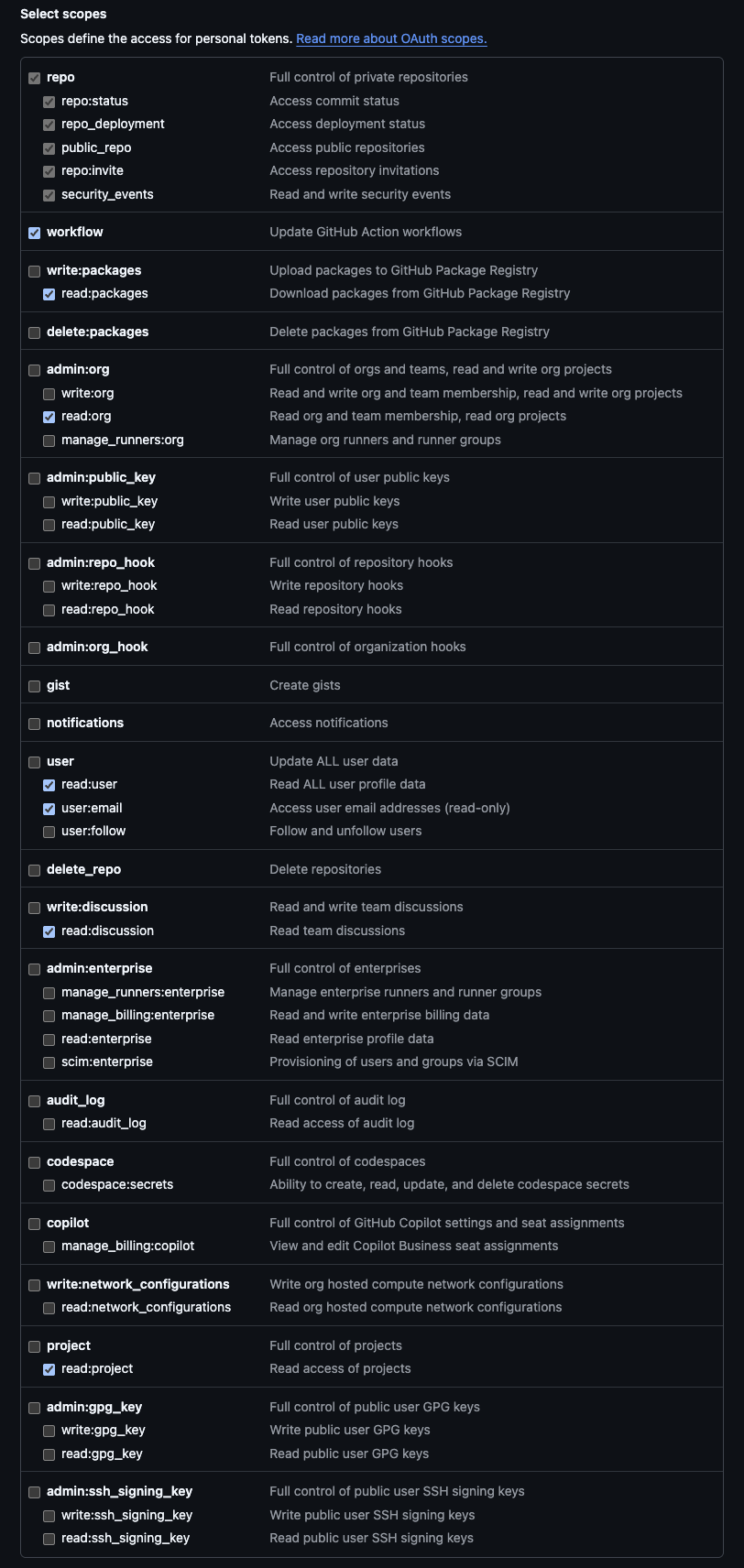
The required scopes and why they are needed are listed below.
Generate SBOM for containers and artifacts
read:packages
Get organization level information
read:orgread:useruser:emailread:projectread:discussion
Access code repositories and their actions to generate SBOM
repoworkflow
For more details on the Github permissions, you can refer to the following documentation: Access permissions on GitHub documentation
Event Configuration
Overview
To enable real-time event processing for GitHub, you need to configure webhooks that forward GitHub events to the Kscope platform.
GitHub Webhook Configuration
Configure the webhook in your GitHub organization settings:
Accessing the Blueprint Account Configuration Form:
To access the Blueprint Account Configuration form in Kscope:
- Navigate to the Kscope platform
- Go to Blueprints → GitHub
- Either:
- Click the edit icon for an existing GitHub blueprint account, or
- Click Add account on the top right part of the navigation bar to create a new account
- The account configuration form will open
Values that you will need to configure the Github webhook:
- Payload URL - This should be copied from the Blueprint Account Configuration form under the Events Endpoint section of the form.
- Secret - This should be obtained by clicking Generate API Key button in the Blueprint Account Configuration form
Configuration Steps:
- Navigate to your GitHub organization settings
- Go to Webhooks → Add webhook
- Enter the Payload URL as copied from the Blueprint Account Configuration form
- Set Content type to
application/json - Enter Secret as copied from the Blueprint Account Configuration form
- Select the events you want to receive (or choose "Send me everything")
- Ensure Active is checked
- Click Add webhook
Supported Events:
The GitHub webhook should be configured to send the following event types:
commit_commentcreatedeleteissue_commentissuesmemberpull_requestpull_request_reviewpull_request_review_commentpush
For more information on GitHub webhooks, refer to the GitHub Webhooks documentation.
SBOM Generation
The GitHub blueprint includes SBOM (Software Bill of Materials) generation for both repositories and container images stored in GitHub Container Registry (GHCR). This provides comprehensive vulnerability scanning and dependency analysis for both source code and containerized applications.
For information about supported languages and package managers for SBOM generation, see: SBOM
Schema Model
| Resources | Source Entity | Normalized Entity | Description |
|---|---|---|---|
| GitHub Organization | github.organization | Organization | A GitHub organization. |
| GitHub Repository | github.repository | Repository | A GitHub repository. |
| GitHub Branch | github.Branch | Branch | A branch within a GitHub repository. |
| GitHub User | github.organization.User | User | A user associated with a GitHub organization. |
| GitHub Package | github.ghcr.Package | Package | A package hosted in GitHub Container Registry. |
| GitHub Workflow | github.repository.Workflow | Workflow | A workflow defined in a GitHub repository. |
| GitHub Workflow Run | github.repository.WorkflowRun | WorkflowRun | A run of a GitHub repository workflow. Note: Only last 100 runs in the last 30 days window are crawled |
| GitHub Workflow Job | github.repository.WorkflowJob | WorkflowJob | A job executed within a workflow run. |
| GitHub Contributor | github.repository.Contributor | Contributor | A contributor to a GitHub repository. |
| GitHub Task Step | github.repository.TaskStep | TaskStep | A task step in a workflow or pipeline. |
| SCA SBOM Package | sca.sbom.Package | Package | A package detected in SBOM analysis. |
| SCA SBOM Document | sca.sbom.Document | Document | An SBOM document for software components. |
| Github Pull Request | github.repository.PullRequest | Pull Request | A Pull Request in a GitHub Repository |
| SCA SBOM Vulnerable Package | sca.sbom.VulnerabilityPackage | Package | A vulnerable package detected by SBOM Scan. |
| SCA SBOM Vulnerability Match | sca.sbom.VulnerabilityMatch | Match | A match indicating vulnerability found by SBOM Scan. |
| SCA SBOM Vulnerability | sca.sbom.Vulnerability | Vulnerability | A vulnerability reported by SBOM Scan. |
| GitHub Timestamp | github.organization.Timestamp | Timestamp | A timestamp associated with GitHub data. |
| GitHub Plan | github.organization.Plan | Plan | A subscription plan for a GitHub organization. |
| GitHub Package Version | github.ghcr.PackageVersion | PackageVersion | A version of a package in GitHub Container Registry. |
| Terraform Vulnerability | sca.sbom.TerraformVulnerability | Vulnerability | Vulnerabilities detected in Terraform modules. |
| Terraform Module | sca.sbom.TerraformModule | Module | A Terraform module used in a configuration. |
| SCA Rule | sca.sbom.Rule | Rule | A rule or policy in SBOM analysis. |
| GitHub Model | models | Model | Data models used in GitHub analysis. |
| DefSec Terraform Vulnerability | defsec | Vulnerability | A Terraform vulnerability detected by DefSec. |
| Findings of gitleak | sca.secretscan.Finding | Vulnerability | A secret detected by gitleak |
| scan. |
Events
| Event | Description |
|---|---|
| CommitCommentEvent | Tracks discussions or feedback on specific commits, enabling collaboration on code changes. |
| CreateEvent | Logs the creation of repositories, branches, or tags, signaling new development milestones. |
| DeleteEvent | Captures the removal of branches or tags, reflecting cleanup or restructuring efforts. |
| IssueCommentEvent | Facilitates discussions by logging comments on issues or pull requests, enhancing issue tracking. |
| IssuesEvent | Monitors actions like creation, closure, or reopening of issues to track progress and resolution. |
| MemberEvent | Logs changes in repository collaborators, supporting access management and team coordination. |
| PullRequestEvent | Tracks pull request activities, such as creation, updates, or merging, for managing code reviews. |
| PullRequestReviewCommentEvent | Records feedback on specific lines of code in pull request reviews, ensuring detailed collaboration. |
| PullRequestReviewEvent | Logs approval, request for changes, or other review actions to facilitate code quality checks. |
| PushEvent | Tracks code pushes to repository branches, capturing details of commits for version control. |