Asset Registry
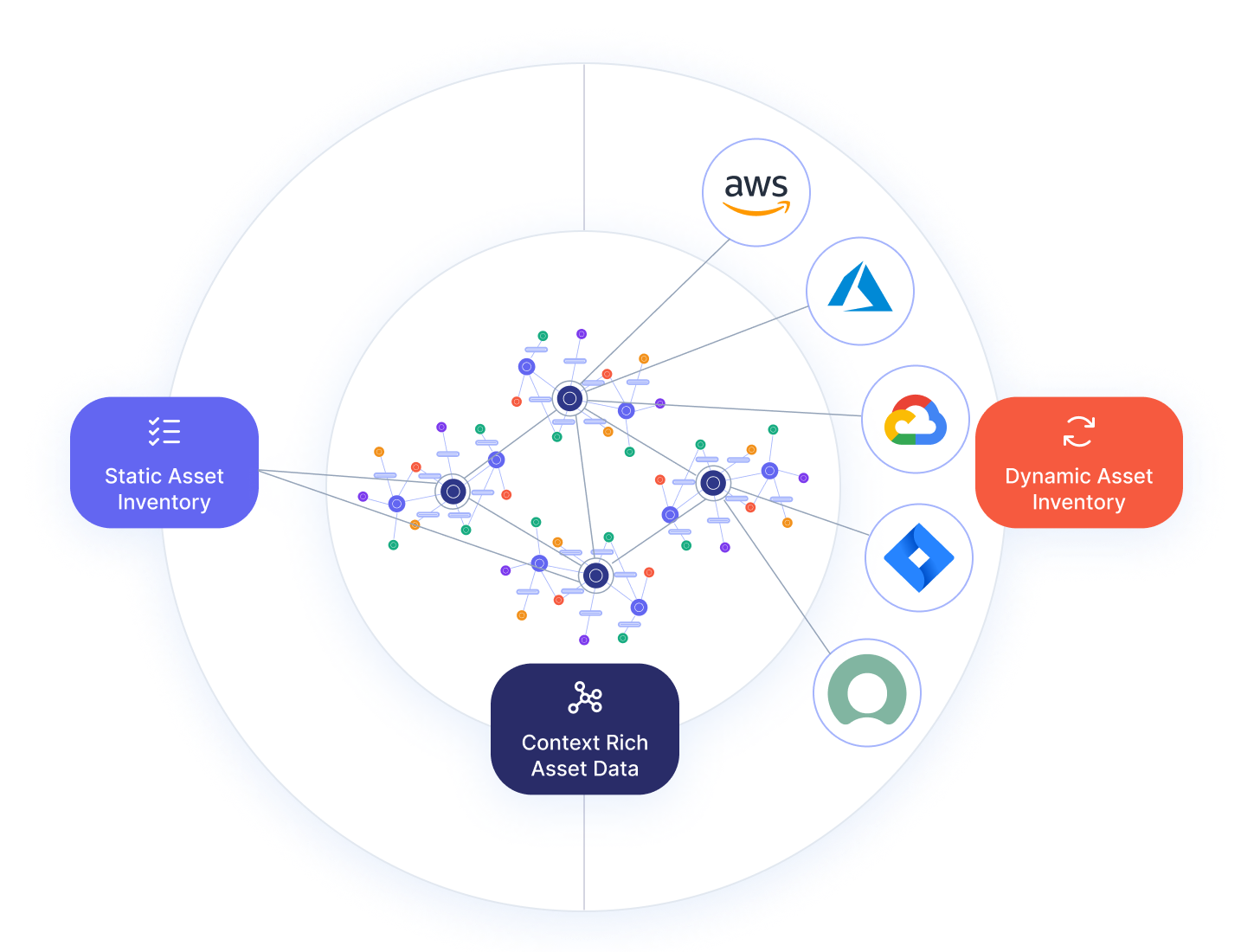
The Asset Registry lets you model, track, and manage your organization's digital assets -- both those discovered automatically via Blueprints and those entered manually. It combines static and dynamic inventory into a single, continuously enriched graph.
Key Capabilities
- Manual + automatic asset tracking -- Enter assets manually for offline/legacy systems, and auto-discover assets via Blueprint integrations
- Automatic correlation -- Manually entered assets are linked to dynamically discovered ones to avoid duplication
- Custom asset classes -- Define asset types and attributes that match your organization's needs
- Enrichment -- Augment auto-discovered assets with business context (owner, criticality, regulatory tags)
Modeling Concepts
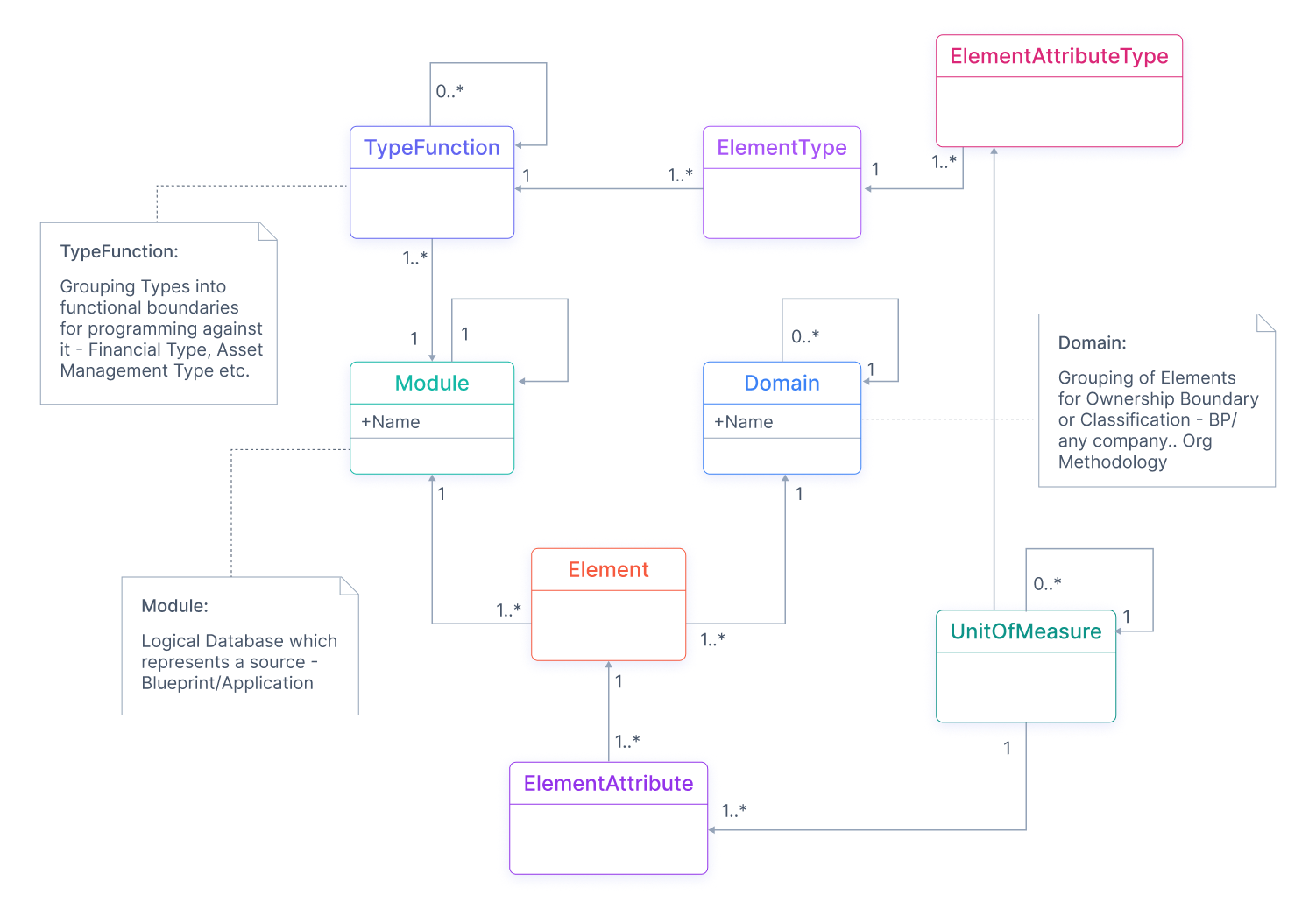
The Asset Registry is built on a graph database model. These constructs define how assets are stored and related:
| Concept | What it does |
|---|---|
| Element Type | Schema/template for a category of assets (e.g., Server, Application, Database) |
| Element | A specific instance of an Element Type -- an actual asset |
| Domain | Logical grouping by business unit or department (e.g., Finance, HR) |
| Module | External data source that supplies assets (e.g., AWS, ServiceNow) |
| Type Function | Groups Element Types into functional categories (e.g., Infrastructure, Software) |
| Type Unit | Unit of measurement or interpretation for properties (e.g., GB, USD, enum values) |
| Relationship (Edge) | Connection between two assets (e.g., PayrollApp RUNS_ON Server_001) |
What comes out of the box
The Asset Registry ships with a pre-configured Canonical Business Context Model (BCM) -- a set of built-in entities that connect your technical assets to business concepts. These are ready to use immediately and cannot be edited or deleted.
| Layer | What is included |
|---|---|
| Domain | Business Context -- the root domain for all BCM-related elements |
| Module | Canonical Business Context -- the data source for the BCM model |
| Type Functions | Canonical Business Context Model (root), with three child categories: Business Layer, Technical Layer, Business Impact Layer |
| Element Types | 16 built-in types across all three layers -- including Product, Customer, Application, ApplicationPackage, Confidentiality, Integrity, Availability, and more |
| Type Units | 30+ built-in units covering basic data types (String, Integer, Boolean, DateTime) and controlled vocabularies (LifecycleStatus, Environment, BusinessCriticality, RegulatoryFramework, and many more) |
| Edge Types | 80+ relationship types (RUNS_ON, DEPENDS_ON, HOSTS, CONTAINS, OWNS, etc.) for modeling how assets connect |
You can extend the model by adding your own entities alongside these built-ins. See each concept's documentation page for the full list of built-in entities.
End-to-end example: modeling a SaaS company
This walkthrough shows how a mid-size SaaS company called Acme Corp would model their asset landscape from scratch, starting with the built-in BCM entities and extending them with custom infrastructure types.
The scenario
Acme Corp runs a B2B SaaS platform. They have:
- Two products: Acme Analytics (flagship) and Acme Insights (add-on)
- Cloud infrastructure on AWS (servers, databases) and a legacy on-premise data center
- Three environments: Dev, Staging, Production
- Two departments consuming IT services: Engineering and Operations
Step 1: Set up Domains
Acme creates Domains to reflect their organizational structure. The built-in Business Context domain is already available for BCM entities.
| Domain | Parent | Purpose |
|---|---|---|
Business Context | (built-in) | Products, customers, business impact |
Engineering | (none) | Platform and application assets |
Operations | (none) | Infrastructure and operational assets |
Operations_AWS | Operations | AWS cloud resources |
Operations_OnPrem | Operations | Legacy data center |
Step 2: Set up Modules
Acme registers their data sources. The built-in Canonical Business Context module handles BCM entities.
| Module | Purpose |
|---|---|
Canonical Business Context | (built-in) BCM data |
AWS Integration | EC2, RDS, S3, and other AWS resources |
On-Premise CMDB | Legacy servers and networking equipment |
ServiceNow | ITSM tickets and application catalog |
Step 3: Create custom Type Functions and Element Types
The built-in BCM Type Functions already cover Business Layer, Technical Layer, and Business Impact Layer. Acme adds custom Type Functions for their infrastructure:
| Type Function | Module | Element Types |
|---|---|---|
Cloud Infrastructure | AWS Integration | Server, Database, StorageBucket |
On-Premise Infrastructure | On-Premise CMDB | PhysicalServer, NetworkDevice |
For each Element Type, Acme defines properties with appropriate Type Units:
Server (Cloud Infrastructure):
| Property | Type Unit | Required |
|---|---|---|
instanceId | String | Yes |
instanceType | String | Yes |
region | String | Yes |
storage_capacity | Integer | No |
status | Status (enum) | Yes |
Step 4: Register products and applications (using built-in types)
Using the built-in Product and Application Element Types, Acme registers their core assets:
| Element | Element Type | Domain | Key properties |
|---|---|---|---|
| Acme Analytics | Product | Business Context | productType: subscription, lifecyclePhase: mature |
| Acme Insights | Product | Business Context | productType: subscription, lifecyclePhase: growth |
| Analytics Platform | Application | Business Context | lifecycleStatus: Active, businessCriticality: missionCritical |
| Insights Service | Application | Business Context | lifecycleStatus: Active, businessCriticality: businessOperational |
Step 5: Register infrastructure (using custom types)
| Element | Element Type | Domain | Key properties |
|---|---|---|---|
| prod-api-01 | Server | Operations_AWS | instanceId: i-0abc123, region: us-east-1, status: Active |
| prod-db-primary | Database | Operations_AWS | engine: PostgreSQL, storage_capacity: 500, status: Active |
| legacy-fileserver | PhysicalServer | Operations_OnPrem | location: DC-East, status: Active |
Step 6: Create relationships
With all Elements registered, Acme builds the asset graph by connecting them:
Acme Analytics ──purchases──> Enterprise Customers
Analytics Platform ──realizes──> Acme Analytics
prod-api-01 ──SUPPORTS──> Analytics Platform
prod-db-primary ──SUPPORTS──> Analytics Platform
Analytics Platform ──DEPENDS_ON──> Insights Service
The result
Acme now has a complete, interconnected view of their assets:
- Business context: Which products generate revenue, which customers are affected by outages
- Technical mapping: Which servers and databases support which applications
- Impact analysis: If
prod-db-primarygoes down, they can trace the impact through Analytics Platform → Acme Analytics → Enterprise Customers - Organizational visibility: Engineering and Operations each see only their relevant assets through Domain scoping
Quick-start: modeling IT assets
A simpler example for getting started quickly. A company tracks servers, applications, and databases across Finance and HR departments, sourced from AWS and ServiceNow.
| Concept | Example |
|---|---|
| Element Types | Server {name, IP, storage_capacity}, Application {name, version, owner}, Database {name, type, size} |
| Type Functions | Infrastructure: Server. Software: Application, Database |
| Modules | AWS (servers), ServiceNow (apps, databases) |
| Domains | Finance: Server_001, PayrollApp. HR: Server_002, HR_DB |
| Type Units | storage_capacity -> GB, size -> GB |
| Relationships | PayrollApp RUNS_ON Server_001, HR_DB HOSTED_ON Server_002 |